10 Costly React Mistakes I Still See in Enterprise Applications After 11+ Years
Introduction
After spending more than 11 years building frontend applications, I’ve realized something interesting.
Most React problems don’t come from React itself.
They come from the way teams use React.
I’ve worked on healthcare dashboards, enterprise platforms, retail applications, design systems, and large-scale React projects. I’ve reviewed hundreds of pull requests, mentored developers at different experience levels, and spent countless hours debugging issues that didn’t exist when the feature was first delivered.
The pattern is always the same.
The code works.
The feature gets released.
Everyone moves on.
Then six months later, the same code becomes difficult to maintain, difficult to extend, and difficult to debug.
In this article, I’ll share the 10 costly React mistakes I still see in enterprise applications and how to avoid them.
What You’ll Learn
- Overusing useEffect
- Unnecessary Re-renders
- Poor State Management
- Prop Drilling
- Performance Optimization
- Large Components
- TypeScript Mistakes
- Folder Structure Problems
- Error Handling
- Testing Strategies
1. Treating useEffect Like a Universal Solution
Why Developers Do This
One pattern I repeatedly notice during code reviews is developers reaching for useEffect whenever something changes.
Need to update state?
useEffect.
Need to calculate a value?
useEffect.
Need to transform data?
useEffect.
Over time the component becomes a chain of effects reacting to other effects.
Real Example
const [fullName, setFullName] = useState("");

useEffect(() => {
  setFullName(`${firstName} ${lastName}`);
}, [firstName, lastName]);
Better Approach
const fullName = `${firstName} ${lastName}`;
Mentor Advice
Whenever I review a pull request containing a new useEffect, I ask one question:
“What side effect are we handling?”
If the answer is “none,” the effect usually shouldn’t exist.

When Should You Use useEffect?
2. Ignoring Re-render Behavior
Everything feels fast during development.
Your laptop is powerful.
Your test data is small.
Production is where reality appears.
Real Example
<FilterPanel
  onChange={(value) => handleFilterChange(value)}
/>
Every render creates a new function reference.
Memoization becomes ineffective.
Better Approach
const handleFilterChange = useCallback(
  (value) => updateFilter(value),
  []
);
Mentor Advice
Before adding useMemo everywhere, open React DevTools Profiler.
Measure first.
Optimize second.
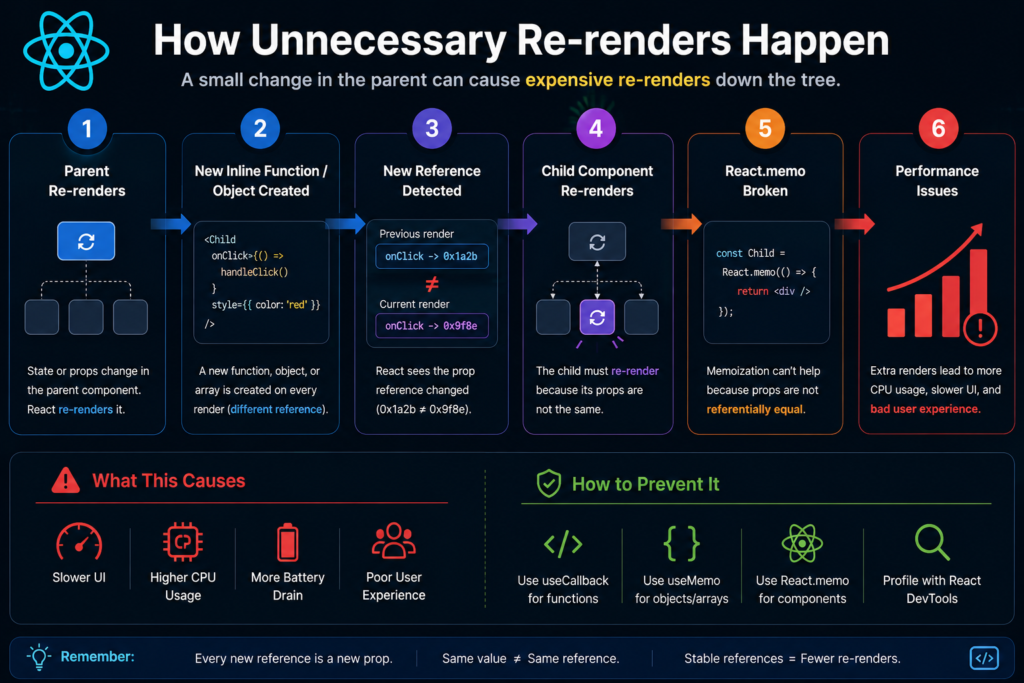
How Unnecessary Re-renders Happen
3. Managing Too Much State
A surprising amount of React state shouldn’t exist.
Real Example
const [products, setProducts] = useState([]);
const [searchTerm, setSearchTerm] = useState("");
const [filteredProducts, setFilteredProducts] = useState([]);
Two sources of truth.
Eventually they drift apart.
Better Approach
const filteredProducts = useMemo(() => {
  return products.filter(product =>
    product.name.includes(searchTerm)
  );
}, [products, searchTerm]);
Mentor Advice
Store only what cannot be derived.
Everything else should be calculated.
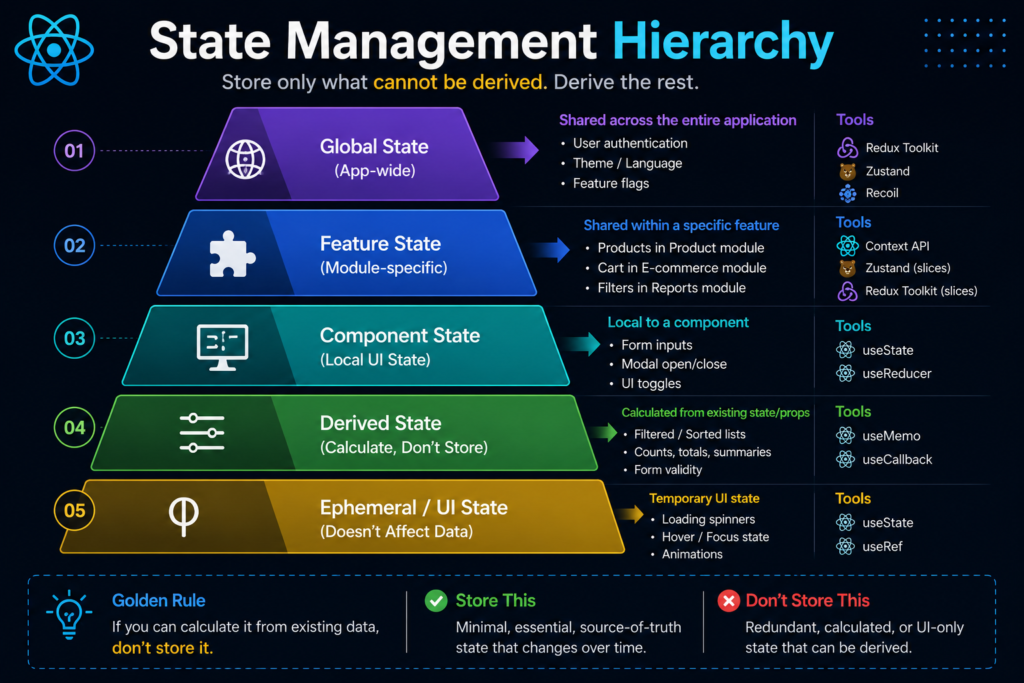
State Management Hierarchy
4. Solving Every Problem With Prop Drilling
Prop drilling isn’t always bad.
But I’ve seen applications where data travels through five or six component layers before reaching the component that actually needs it.
Better Approach
Use:
- Context API
- Zustand
- Redux Toolkit
Mentor Advice
Choose the simplest solution that scales.
5. Thinking About Performance Too Late
Performance is easier to build in than retrofit later.
Common Mistake
data.map(item => (
  <Row key={item.id} />
))
Better Approach
- react-window
- react-virtualized
- Lazy loading
- Code splitting
Mentor Advice
The fastest component is often the one that never renders.
6. Writing Massive Components
I’ve reviewed components that exceeded 2,500 lines.
Nobody plans for it.
It happens gradually.
Common Symptoms
- API calls
- Form validation
- Business logic
- Rendering
- Analytics
- State management
All inside one component.
Better Approach
Break responsibilities apart.
Use:
- Smaller components
- Custom hooks
- Service layers
Mentor Advice
Smaller components are easier to test, review, maintain, and replace.

From Monolithic Components to Modular Architecture
7. Using TypeScript Without Type Safety
One of the most common anti-patterns:
const user: any = response.data;
At this point TypeScript isn’t helping much.
Better Approach
interface User {
  id: string;
  name: string;
  email: string;
}
Mentor Advice
Every unnecessary any becomes future technical debt.
8. Poor Folder Structure
Many React applications start with:
src
├── components
├── hooks
├── services
├── utils
Looks clean initially.
Becomes painful later.
Better Approach
Organize by feature.
features
├── users
├── products
├── orders
9. Ignoring Error Handling
Many applications assume APIs always succeed.
Production quickly proves otherwise.
Better Approach
- Error Boundaries
- Retry Mechanisms
- Fallback UI
- Centralized Logging
Mentor Advice
Always design for failure.
10. Treating Testing as Optional
A shared utility changes.
Twenty pages break.
Nobody notices until production.
Better Approach
Test:
- Business Logic
- Critical Flows
- User Workflows
Tools:
- Jest
- React Testing Library
- Playwright
- Cypress
Mentor Advice
Testing doesn’t slow development.
Fixing regressions does.
Senior Engineer Perspective
The biggest shift in my career happened when I stopped thinking about components and started thinking about systems.
Mid-level developers ask:
“How do I build this feature?”
Senior developers ask:
“How will this feature evolve over the next two years?”
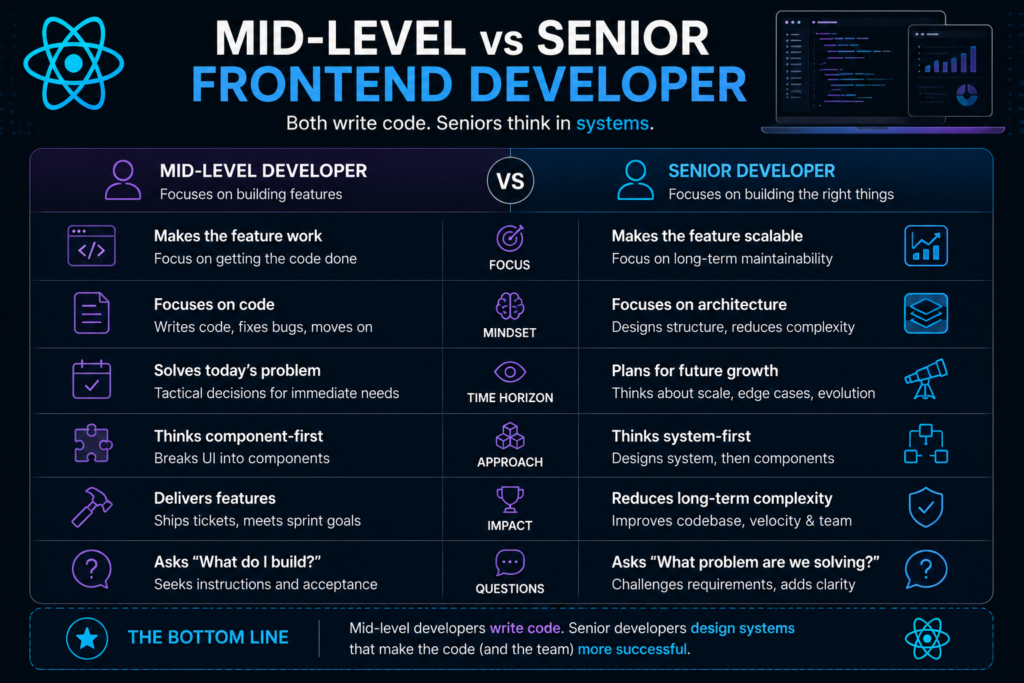
Mid-Level vs Senior Frontend Developer
Key Takeaways
- Use useEffect only for real side effects.
- Keep state minimal.
- Understand render behavior.
- Optimize based on measurements.
- Build smaller components.
- Use TypeScript properly.
- Organize code for scale.
- Handle failures gracefully.
- Invest in testing.
- Think beyond the current sprint.
Conclusion
React itself isn’t difficult anymore.
Building React applications that remain maintainable after years of development is.
The goal isn’t writing clever React code.
The goal is writing code that another engineer can confidently maintain six months from now.
That’s what separates experienced React developers from engineers who simply know React.
FAQ
What are the most common React mistakes?
Overusing useEffect, unnecessary re-renders, poor state management, and lack of testing.
How can I improve React performance?
Use profiling tools, reduce unnecessary renders, implement code splitting, and virtualize large lists.
Should every React project use TypeScript?
For production applications, yes.
Is Context API enough?
For many applications, yes. Larger applications may benefit from Zustand or Redux Toolkit.
How do I become a Senior React Developer?
Focus on architecture, scalability, maintainability, performance, and mentoring—not just writing components.
Its very useful content. Keep it up and continue with these kind of contents.